

The right approach for most engineering teams is an agent-native harness with human-in-the-loop safety controls, not a chatbot bolted onto an IDE. GnamiAI fits that category well for teams that want direct local-file editing, the freedom to bring their own model, and instant rollback when an agent gets something wrong. Higher autonomy buys more speed, but it demands better test coverage and a real cost budget before you flip it on.
TL;DR:
- Agent harnesses that manage state, verify changes, and support rollback are essential for deploying AI coding agents safely and reliably.
- Local file control and the ability to bring your own model enhance security, control, and cost efficiency, especially for sensitive codebases.
- Teams should evaluate agents on real tasks within two weeks, focusing on reliability, verification, security, cost, integrations, and transparency.
- A well-maintained test suite, modular code, and automated CI pipeline are critical to maximize the benefits of an AI coding agent.
- GnamiAI offers local execution with built-in safety features, making it a suitable starting point for teams with decent testing and modular repositories.
Table of Contents
- What Do AI Coding Agents Actually Do Today?
- Which Agent Type Fits Your Team's Job?
- How Do You Evaluate an AI Coding Agent Before Committing?
- What Does Your Repo Need Before an Agent Can Touch It?
- How Does GnamiAI Map to These Evaluation Criteria?
- Should Your Team Pilot or Fully Adopt an Agent Right Now?
- Where to Read More on Agent Harnesses and Costs
- Try GnamiAI on Your Own Codebase Before You Commit to Anything Bigger
- Sources
- FAQ
What Do AI Coding Agents Actually Do Today?
An AI coding agent is software that reads your codebase, decides what to change, and executes that change with varying degrees of independence. That is different from autocomplete or a chat window that suggests snippets you paste in yourself. The agent opens files, runs commands, calls tools, and in the more advanced setups, creates pull requests without a human typing every line.
Four practical categories cover almost everything on the market right now:
- IDE-native agents live inside your editor and act on the file you have open, with tight feedback loops but limited scope beyond that session.
- Terminal or CLI agents run from the command line, often with broader repo access and the ability to chain multi-step tasks like "fix the failing tests, then update the changelog."
- Cloud-hosted agents with sandboxes execute in a remote environment, which is useful for long-running tasks but raises questions about where your code and secrets travel.
- Local or offline agent harnesses run against your own model subscription on your own machine, trading some raw model power for control over data and cost.
The capability that actually separates a toy demo from a production tool is the harness around the model, not the model itself. OpenAI frames this directly: its Agents API exists specifically to give developers a managed way to handle tool calling, context management, and sandboxed execution, because a raw language model has no memory of your repo structure and no safe way to run a shell command on its own. The harness is what turns "smart autocomplete" into something that can read your test suite, run it, and act on the results.
That distinction shows up in almost every serious comparison of agentic coding assistants. A model can be excellent at reasoning about code and still produce unreliable output if the surrounding system does not manage state, verify changes, or know when to stop. Common capabilities worth checking across any agent you evaluate include repo-wide reading (not just the open file), automated test execution, file edits with diffs you can review, PR creation, task scheduling for longer jobs, and some form of memory or session state across multi-step work. Missing any of these usually means you are looking at a demo, not a working tool.
Which Agent Type Fits Your Team's Job?
Matching agent type to task saves you from evaluating features you will never use. Here is how the four categories play out in real work, followed by the checklist worth running against any candidate.
- IDE-native agents shine for tight, single-file work: renaming a function across a small module, writing a test for a function you just wrote, or explaining an unfamiliar block of code. They are fast and low-risk because the blast radius is one file, but they rarely handle cross-repo refactors well.
- CLI and terminal agents handle multi-file, multi-step jobs: "add a new API endpoint, wire it into the router, write the integration test." Because they operate from the command line, they can chain git operations, run build scripts, and touch dozens of files in one pass. That power is exactly why repo hygiene matters more here than anywhere else.
- Cloud-hosted sandboxed agents are built for long-running or resource-heavy tasks, like a dependency upgrade across a monorepo that takes twenty minutes of build time. OpenAI's Codex is marketed around exactly this pattern: long-running sessions, context compaction so the agent does not lose track of a large task, and tool orchestration across multiple steps. The trade-off is that your code and secrets leave your machine, which matters a lot for regulated industries.
- Local or offline harnesses run against a model you already subscribe to, on your own hardware. Practitioner writing on local and open-weight models consistently frames this as the right call when privacy, control, or cost rule out sending code to a third-party cloud. You give up some of the largest model's raw capability in exchange for knowing exactly where your code goes.
Pro Tip: Do not evaluate agent types in the abstract. Pick your two most common weekly tasks (a typical bug fix and a typical feature ticket), then test each agent type against those two tasks specifically. Abstract feature lists lie; your actual backlog does not.
The trade-offs worth writing down before you commit: latency (cloud sandboxes are slower to spin up but handle bigger jobs), privacy (local harnesses win here by default), control (how much do you see before a change lands), and cost (which the next section breaks down properly). User feedback aggregated on sites like G2's Tabnine reviews consistently flags integration quality and reliability as the two things that make or break adoption, ahead of raw model benchmarks. That tracks with what most engineering leads say off the record: a slightly weaker model with a solid harness beats a stronger model that keeps losing context mid-task.
How Do You Evaluate an AI Coding Agent Before Committing?
Score every candidate agent against six axes, weight them by what your team actually needs, and run a real pilot before signing anything longer than a month. Vendor demos are optimized to look good in fifteen minutes. Your evaluation needs to survive two weeks of your actual codebase.
The six evaluation axes:
- Reliability and readiness fit. Does the agent perform consistently on your repo's actual structure, or only on the clean demo repo the vendor showed you?
- Verification loops. Can the agent run your test suite automatically and act on failures, or does every change require a human to manually verify correctness?
- Security and data boundaries. Where does your code go during execution, and can you restrict what the agent can read or send externally?
- Cost and token efficiency. What does a typical week of usage cost, and how does that scale as your team grows?
- Integrations and developer experience. Does it fit into your existing git workflow, CI system, and editor setup, or does it require you to change how your team works?
- Transparency of model and harness. Can you tell which model is doing the reasoning and how the harness manages context, or is it a black box?
A simple weighting approach works better than an elaborate scoring spreadsheet nobody maintains. Give each axis a score from one to five, multiply by a weight reflecting your priorities, and total it. The point is not the math. The point is forcing an explicit conversation about what actually matters before you get seduced by a flashy demo.
Cost deserves its own line item because it is moving fast and unpredictably. Providers have started tightening usage limits as agent workloads scale: Anthropic introduced new rate limits specifically targeting power users of Claude Code, a direct response to how much compute heavy agentic usage consumes. That is not a hypothetical concern. If your evaluation only measures output quality and ignores what a month of real usage costs at your team's scale, you will get a nasty budget surprise three months in. Benchmark cost per completed task, not cost per API call, during your trial.
On the flip side, the market is validating that agentic tools are worth paying for. Reports indicate Cursor has crossed $2 billion in annualized revenue, which signals real budget allocation happening across the industry for agent-enabled developer tooling, not just experimentation. Teams are treating this as a line item, not a novelty, and your evaluation should reflect that same seriousness.
A 7 to 14 day pilot checklist worth copying:
Run the candidate agent against three real tickets from your actual backlog, not sample tasks the vendor suggests. Measure how often its output passes your existing tests without modification, how much time your team spends reviewing versus writing changes, and what a week of typical usage costs in dollars. Watch for red flags that should stop the pilot early: an agent that cannot explain why it made a change, one that requires disabling your existing security scans to function, or a vendor that cannot tell you clearly where your code and secrets are processed. Any one of those is reason enough to walk away before the trial period ends.
What Does Your Repo Need Before an Agent Can Touch It?
Readiness matters more than model choice. A team with modular code and a solid test suite will get dramatically better results from a mid-tier agent than a team with tangled code will get from the best model on the market. This is not a minor caveat. It is close to the whole story. Research on developer tooling from MIT's Missing Semester makes the same point about tooling generally: the quality of your surrounding infrastructure, not the sophistication of any single tool, determines whether automation actually helps or actually hurts.
Repository hygiene checklist, roughly in priority order:
- Automated tests with real coverage. An agent that changes code with no test suite to catch regressions is gambling with your production system. Unit tests catch obvious breakage; integration tests catch the subtle stuff agents are more likely to miss.
- Modular code structure. Agents perform far better on codebases where responsibilities are separated cleanly than on tightly coupled monoliths where one change ripples unpredictably through five other files.
- A working CI pipeline. If your tests only run when a human remembers to run them locally, an agent's changes will slip through untested. CI makes verification automatic instead of optional.
- Typechecking wired into the build. Static type checks catch a category of error agents are prone to (subtle argument mismatches, wrong return types) before a human ever reviews the diff.
- Pinned dependencies. An agent working against an unpinned dependency tree can introduce version drift that breaks builds in ways that have nothing to do with the actual task it was given.
The verification loop is where most of the real engineering work happens. In practice, a solid pipeline automatically runs unit tests, integration tests, typechecks, and linting on any agent-produced change before a human ever looks at it. Teams that skip this step see dramatically higher rework rates, because a human reviewer catches far less than an automated test suite catches, especially under time pressure.
Pro Tip: Treat your first agent pilot as a test of your CI pipeline, not just the agent. If the pilot reveals gaps in your test coverage, that is valuable information even if the agent itself underperforms. Fix the gap, then re-run the trial.
Human-in-loop checkpoints are not optional friction. They are what makes autonomous agent work safe enough to trust. A sound staged rollout pattern looks like this: agent-created changes land first in a feature branch, a CI job runs smoke tests and validates key metrics, and if anything regresses past your defined threshold, the system automatically opens a rollback pull request rather than waiting for a human to notice something broke in production. That pattern, recommended in OpenAI's own guidance on agent deployment, turns rollback from a manual scramble into a built-in safety net.

Three workflow templates map cleanly onto common team needs. For feature development, the agent drafts the implementation and tests, a CI job runs the full suite, and a human reviews the diff before merge. For refactors, the agent works against existing test coverage as a correctness contract, since refactors should not change behavior, only structure. For production bug triage, the agent reproduces the bug in an isolated branch, proposes a fix with a regression test attached, and a human approves before it touches the main branch. In every template, the agent proposes and CI verifies, but a person makes the final merge call.
How Does GnamiAI Map to These Evaluation Criteria?
GnamiAI was built around the exact readiness principles the sections above describe: direct local-file access, verification you control, and rollback that does not require a manual git archaeology session. It is a Windows desktop application, which means the agent works directly on the files sitting in your project folder rather than routing everything through a remote cloud session.
That local-first design maps onto the evaluation axes in specific ways worth spelling out:
- Security and data boundaries. Because GnamiAI interacts with your files directly on your machine, you retain more control over what leaves your environment than you would with a fully cloud-routed agent.
- Cost and token efficiency. Local runs use your own model subscription, which means the cost is whatever you already pay that provider. Cloud sandbox execution is metered separately through monthly credits, so you can choose the mode that fits a given task's budget.
- Transparency of model and harness. GnamiAI supports bringing your own key or subscription across multiple AI models, so you know exactly which model is doing the reasoning on any given task rather than being locked into one opaque default.
- Verification and rollback. Every agent-made change comes with instant, one-click rollback, closer to a built-in undo button for autonomous edits than a manual git revert.
- Workflow fit. Three modes (Autopilot, Forge, and Stream) cover a range from simple file edits to more advanced task automation, so a team can start conservative and expand scope as trust in the tool grows.
| Evaluation axis | How GnamiAI addresses it |
|---|---|
| Local file control | Direct read, edit, and command execution within your project folder |
| Model flexibility | Bring-your-own-key or subscription across multiple AI models |
| Safety and rollback | Instant, one-click rollback of agent-made changes |
| Workflow scope | Three modes (Autopilot, Forge, Stream) for different task complexity |
| Cost structure | Free local runs on your own model subscription; metered cloud credits for sandbox execution |
A sensible 30 to 90 day evaluation checklist looks like this: start in Forge or Stream mode on a low-risk task (a small refactor or a well-tested bug fix), confirm the rollback actually restores a clean state before trusting it on anything bigger, then track how often output passes your existing test suite without manual correction. Expand to Autopilot only once you have a few weeks of evidence that the agent's changes consistently pass your CI gate. Measuring quality this way, against your own test suite rather than a vendor's demo, is the only evaluation that actually predicts how the tool performs on your codebase six months from now.
Should Your Team Pilot or Fully Adopt an Agent Right Now?
Teams with solid test coverage and modular repos get the most out of agentic coding tools almost immediately, because the verification loop that makes autonomy safe is already in place. If your codebase is tightly coupled with thin test coverage, pilot cautiously on isolated, low-risk tasks first. Fixing your readiness gaps will pay off more than switching agent vendors ever will.
The most common pitfall is not the agent producing bad code. It is teams skipping the review step because the diff looks plausible. Plausible is not the same as correct, and an agent under time pressure to look useful will produce confident, well-formatted, wrong code just as easily as a junior engineer will. Mitigate this by keeping a human on the merge button for at least the first several months, no matter how good the early results look.
The practical checklist that actually works: start with one team and one low-risk workflow, measure output against real tests rather than gut feel, and expand scope only after you have evidence, not enthusiasm. Agentic coding tools reward teams that are already disciplined about testing and punish teams that were hoping automation would substitute for that discipline.
— Gabriel
Where to Read More on Agent Harnesses and Costs
For deeper technical detail on how agent harnesses manage tools, context, and sandboxing, OpenAI's own Agents API announcement is worth reading directly. For the readiness argument behind why tests and modular code matter more than model choice, MIT's Missing Semester materials lay out the underlying engineering principles. For how usage costs are evolving at scale, TechCrunch's coverage of Anthropic's rate limit changes is a useful real-world data point.
Try GnamiAI on Your Own Codebase Before You Commit to Anything Bigger
GnamiAI gives you direct control that cloud-only agents cannot: your files stay on your machine, you choose which model does the reasoning, and every change comes with a one-click rollback if it goes wrong. That combination, local execution, model flexibility, and built-in safety nets, is exactly what the evaluation framework above is asking you to look for.
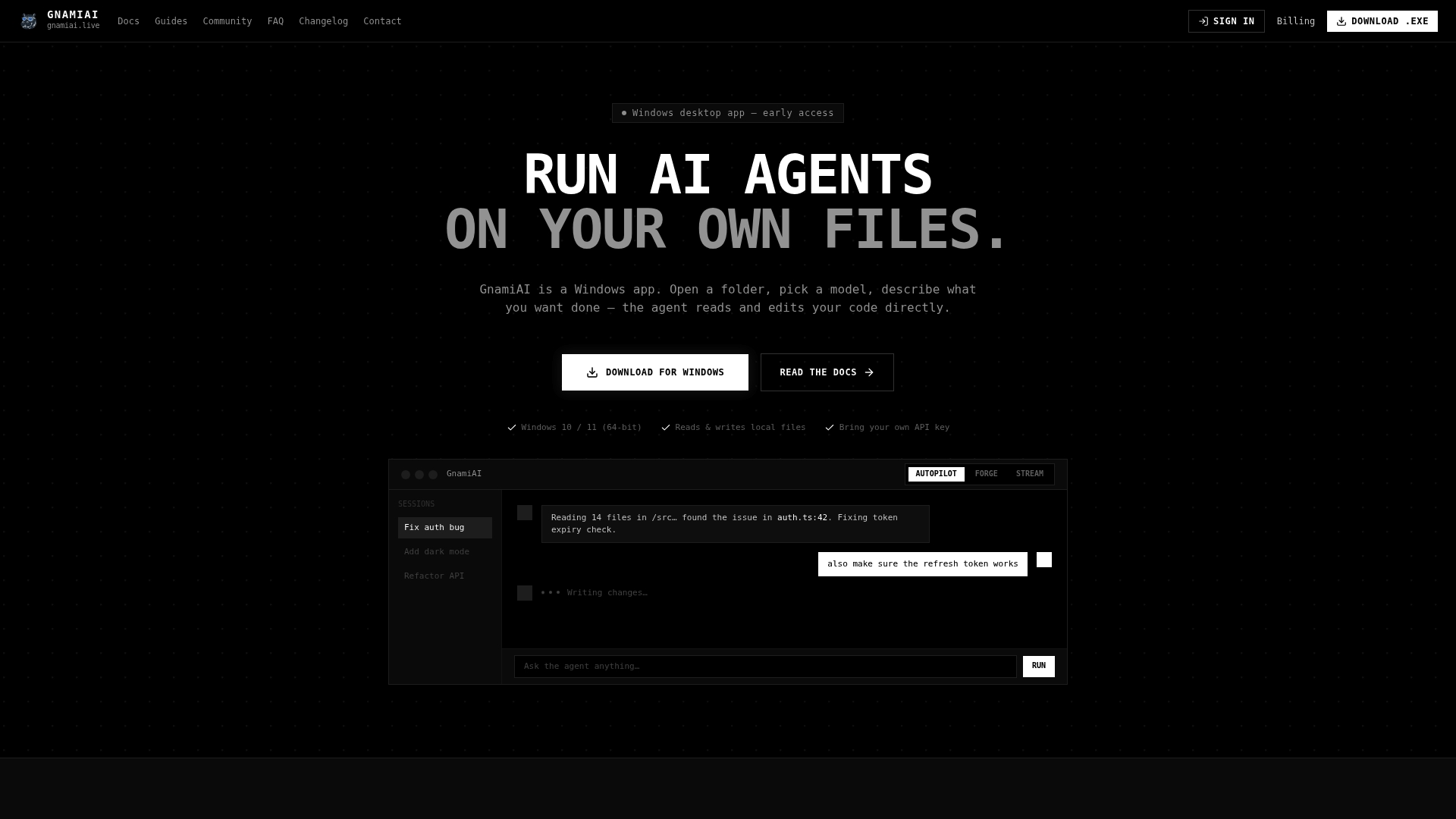
If your team already has decent test coverage and a repo that is not a tangled mess, you are a good candidate to start now rather than wait for a "perfect" agent to arrive. Begin with a small, low-risk task in Forge or Stream mode, confirm the rollback works the way you expect, and use that as your evidence before expanding scope. GnamiAI's Pro plan runs $29 per month, with local runs on your own model subscription costing nothing extra beyond what you already pay that provider. Check the product changelog for the latest mode capabilities, then open your project folder and give the agent one real ticket to prove itself on.
Sources
- The Missing Semester of Your CS Education
- Anthropic unveils new rate limits to curb Claude Code power users | TechCrunch
FAQ
What Are AI Coding Agents?
AI coding agents are software systems that read your codebase, decide what changes to make, and execute those changes with some degree of independence, ranging from suggesting a diff for review to running commands and creating pull requests on their own. The harness around the model, not just the model itself, determines how reliably it can read files, run tests, and manage long tasks, as OpenAI's Agents API documentation makes clear.
Which AI Agent Is Best for Coding?
There is no single best agent for every team; the right choice depends on whether you need local file control, cloud-scale execution, or tight IDE integration. For teams that want direct local-file editing, flexibility to bring their own model, and instant rollback safety, GnamiAI is a strong in-category option worth piloting on a real task before committing further.
Does ChatGPT Have a Coding Agent?
Yes. OpenAI offers Codex, an agentic coding tool built to run long sessions that read files, write code, and manage multi-step tasks through a managed cloud harness. It represents the cloud-hosted sandbox category rather than a local, offline approach.
What Are the 7 Types of AI Agents?
Definitions of AI agent categories vary widely across sources and are not standardized the way coding-agent types are. For coding specifically, the practical categories that matter are IDE-native agents, terminal or CLI agents, cloud-hosted sandboxed agents, and local or offline harnesses, each suited to different tasks and risk tolerances.
How Much Does GnamiAI Cost?
GnamiAI's Pro plan costs $29 per month. Local runs using your own AI model subscription are free beyond that, while cloud sandbox execution draws from metered monthly credits included in the plan.